
Visibility  

Model users and model developers are usually distinct persons. Therefore, users may not be aware of model limitations. Moreover, only a few model parameters may be meaningful to them.
To address these issues, CoSApp allows model developers to specify the validity range and visibility scope of all variables. This section addresses the visibility scope.
The concept
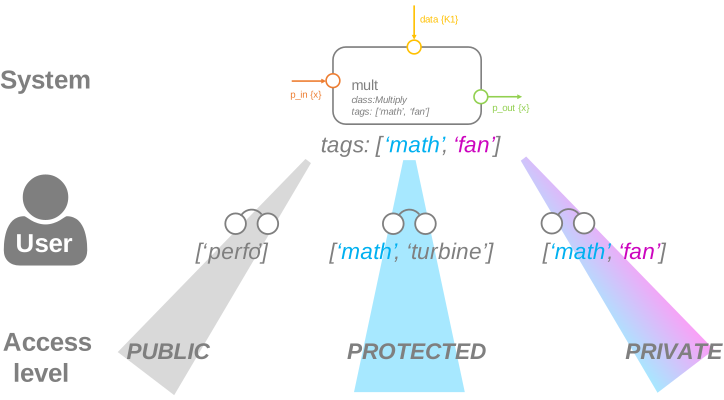
Three levels of visibility are available in CoSApp:
PUBLIC: Everybody can set those variablesPROTECTED: Only advanced and expert users may set those variablesPRIVATE: Only expert users may set those variables
The accessibility is the intersection between the System tags and the User role:
PUBLIC: no shared tagPROTECTED: more than one shared tag (but not all)PRIVATE: same tags list
Example
Consider the mechanical and aerodynamic design of a turbine blade, involving three specialists: a mechanical engineer, an aerodynamics expert and a system engineer.
The models for such study could concievably define the following variable scopes:
class MechanicalBlade(System):

    tags = ['blade', 'mechanics']

    def setup(self):
        self.add_inward('height', 0.4, scope=Scope.PUBLIC)
        self.add_inward('thickness', 0.01, scope=Scope.PROTECTED)
        self.add_inward('material', 'steel')  # Scope is PRIVATE by default


class AerodynamicBlade(System):

    tags = ['blade', 'aerodynamics']

    def setup(self):
        self.add_inward('height', 0.4, scope=Scope.PUBLIC)
        self.add_inward('thickness', 0.01, scope=Scope.PROTECTED)
        self.add_inward('camber', 1e-3)  # Scope is PRIVATE by default


class Blade(System):

    tags = ['blade', 'integration']

    def setup(self):
        self.add_child(MechanicalBlade('mechanics'), pulled={'height': 'height'})
        self.add_child(AerodynamicBlade('aerodynamic'), pulled={'height': 'height'})
Users will be assigned the following tags:
User |
Role |
|---|---|
Mechanical Engineer |
[“blade”, “mechanics”] |
Aerodynamics Engineer |
[“blade”, “aerodynamics”] |
System Engineer |
[“integration”] |
Variable credentials for the three specialists will then be:
User |
MechanicalBlade |
AerodynamicBlade |
Blade |
|---|---|---|---|
Mechanical Engineer |
PRIVATE |
PROTECTED |
PROTECTED |
Aerodynamics Engineer |
PROTECTED |
PRIVATE |
PROTECTED |
System Engineer |
PUBLIC |
PUBLIC |
PROTECTED |
Defining visibility
The example highlights the link between a user’s role and their ability to set a particular variable.
User roles are currently saved in a configuration file (%USERPROFILE%.cosapp.dcosapp_config.json on Windows, and $HOME/.cosapp.d/cosapp_config.json on Linux/Unix). A role is defined as a list of tags, akin to user groups in Unix OS. For example, the Aerodynamics Engineer will be assigned the following roles:
{
  "roles" : [
    ["aerodynamics", "rotor"],
    ["aerodynamics", "stator"]
  ]
}
The variable visibility for a given user is determined by comparing user roles with the tags of each System. If one role matches exactly the System tags, the user will have PRIVATE clearance on the System. If one role tag matches at least one system tag, the user will have PROTECTED clearance. Otherwise the user will have PUBLIC access.
Visibility of validity ranges is set at Port or System level. However, unlike validity parameters, it is not possible to modify a Port variable visibility inside a System.
For example, in a Port:
[2]:
from cosapp.base import System, Port, Scope

class MyPort(Port):

    def setup(self):
        self.add_variable('v', 22.)  # Scope is PUBLIC by default
        self.add_variable('w', 22., scope=Scope.PRIVATE)
        self.add_variable('x', 22., scope=Scope.PROTECTED)
        self.add_variable('y', 22., scope=Scope.PUBLIC)
As the purpose of ports is the exchange of information between systems, it should not be common to define a scope on them. Therefore the default visibility of port variables is PUBLIC.
In a System:
[3]:
class MechanicalBlade(System):

    tags = ['blade', 'mechanics']  # Tags must be specified to activate visibility, otherwise all variables will be open.

    def setup(self):
        self.add_inward('height', 0.4, scope=Scope.PUBLIC)
        self.add_inward('thickness', 0.01, scope=Scope.PROTECTED)
        self.add_inward('material', 'steel')  # Scope is PRIVATE by default

        port_in = self.add_input(MyPort, 'port_in')
        # Visibility of variable v in port_in cannot be modified

        port_out = self.add_output(MyPort, 'port_out')
Inwards are the preferred variables to define a restrained visibility. Hence, their default scope is PRIVATE.
Displaying visibility
To obtain the documentation of a System or a Port, you can use the utility function display_doc.
Variables with PRIVATE scope will be marked with symbols 🔒🔒, and PROTECTED ones with 🔒.
[4]:
from cosapp.tools import display_doc

display_doc(MyPort)
[5]:
display_doc(MechanicalBlade)
Testing visibility
If a variable has a scope other than PUBLIC, users will not be able to set it except if they have the right role.
Only inputs and inwards may be protected, as outputs and outwards are overwritten at each System execution.
So assuming you are not assigned roles ['blade', 'runner'], here are the variables you cannot touch:
[6]:
from cosapp.base import ScopeError

BladeRunner = MechanicalBlade  # Class duplication
BladeRunner.tags = ['blade', 'runner']  # Changing the tags on the new class

b = BladeRunner('Ridley')

from warnings import warn

try:
    b.thickness = 0.01
except ScopeError as err:
    warn(f"ScopeError raised: {err}")
<ipython-input-1-a5727816a787>:13: UserWarning: ScopeError raised: Cannot set out-of-scope variable 'thickness'.
  warn(f"ScopeError raised: {err}")
[7]:
try:
    b.material = 0.01
except ScopeError as err:
    warn(f"ScopeError raised: {err}")
<ipython-input-1-a113582af145>:4: UserWarning: ScopeError raised: Cannot set out-of-scope variable 'material'.
  warn(f"ScopeError raised: {err}")
[8]:
try:
    b.port_in.w = 0.01
except ScopeError as err:
    warn(f"ScopeError raised: {err}")
<ipython-input-1-111ce8585889>:4: UserWarning: ScopeError raised: Cannot set out-of-scope variable 'w'.
  warn(f"ScopeError raised: {err}")
However, visibility on output port is not enforced:
[9]:
b.port_out.w = 0.01
print(b.port_out)
MyPort: {'v': 22.0, 'w': 0.01, 'x': 22.0, 'y': 22.0}