
Drivers
What is a Driver?!
Driver objects allow users to modify the state of a System for a given purpose. Resolution of non-linear equations, optimization, or time integration of dynamic equations are typical examples of Driver usage. As will be seen in this tutorial, drivers can also be nested and/or chained, to create a customized simulation workflow.
Introduction
Add a Driver
Simply use the add_driver method passing the Driver object you want to use (see Available drivers section of this tutorial).
[1]:
from cosapp.base import System
from cosapp.tests.library.ports import XPort

class MultiplySystem(System):

    def setup(self):
        self.add_input(XPort, 'p_in', {'x': 1.})
        self.add_output(XPort, 'p_out', {'x': 1.})

        self.add_inward('K1', 5.)

    def compute(self):
        self.p_out.x = self.p_in.x * self.K1
[2]:
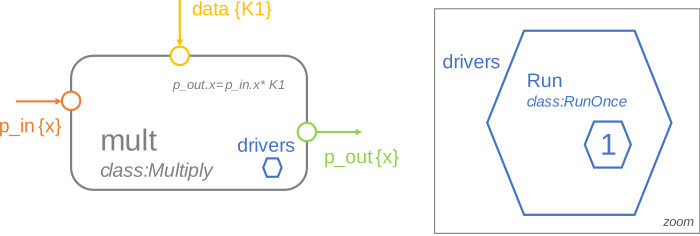
from cosapp.drivers import RunOnce

m = MultiplySystem('mult')
run = m.add_driver(RunOnce('run'))
Implementation
Every System (including sub-systems) may have one or multiple Driver objects. They are stored in the drivers attribute. By default, no Driver is attached to a System.
The run_drivers method of System executes drivers recursively. In the following example, the simplest driver RunOnce is added and executed.
[3]:
m = MultiplySystem('mult')
m.add_driver(RunOnce('run'))
print('m.drivers:', m.drivers) # print drivers of the system

m.K1 = 2.
m.p_in.x = 15.
m.run_drivers()

print(f"m.p_out.x = {m.p_out.x}")
m.drivers: OrderedDict([('run', run (on System 'mult') - RunOnce)])
m.p_out.x = 30.0
Driver chains and subdrivers
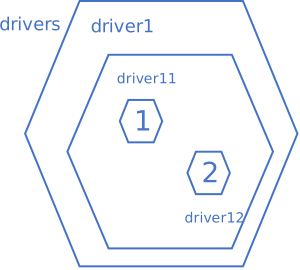
If several drivers are attached to a system, run_drivers will execute them in turn, as a sequence of drivers. Furthermore, like a System, each individual Driver may have children, which also inherit from base class Driver. Nested drivers are created with method add_child of class Driver; they are stored in attribute children of the parent driver.
By construction, a System can have as many levels of drivers as required.
Driver chains and nested drivers thus allow users to define complex simulation scenarios, such as workflows, multi-point design, designs of experiment, optimization, etc.
[4]:
m = MultiplySystem('mult')
run = m.add_driver(RunOnce('run'))

print(f"run.children: {run.children}")  # driver 'run' has no child
run.children: OrderedDict()
[5]:
subrun = run.add_child(RunOnce('subrun'))  # add a sub-driver 'subrun'

print(f"run.children: {run.children}", f"subrun.children: {subrun.children}", sep="\n")
run.children: OrderedDict([('subrun', subrun (on System 'mult') - RunOnce)])
subrun.children: OrderedDict()
Available Drivers
CoSApp comes with a set of drivers to help users build their simulations.
RunOnce
As the name suggests, RunOnce makes your System and its subsystems compute their code once. It does not deal with residues or iterative loops that may be necessary to resolve the System. Instead, it merely transports information from the top system down to the lowest level sub-systems.
[6]:
from cosapp.base import System
from cosapp.tests.library.ports import XPort

class MultiplySystem(System):

    def setup(self):
        self.add_input(XPort, 'p_in', {'x': 1.})
        self.add_output(XPort, 'p_out', {'x': 1.})

        self.add_inward('K1', 5.)

    def compute(self):
        self.p_out.x = self.p_in.x * self.K1


class MultiplyWithResidue(MultiplySystem):
    """Same as `MultiplySystem`, including an off-design problem"""
    def setup(self):
        super().setup()

        # off-design problem
        self.add_inward('expected_output', 7.5)
        self.add_unknown('p_in.x').add_equation('p_out.x == expected_output')
[7]:
from cosapp.drivers import RunOnce

m = MultiplyWithResidue('mult')
run = m.add_driver(RunOnce('run'))

m.run_drivers()

print("List of defined drivers\n", dict(m.drivers))

print("",
    f"K1 = {m.K1}",
    f"p_in.x = {m.p_in.x}",
    f"p_out.x = {m.p_out.x}",
    f"residues: {list(m.residues.values())}",
    sep="\n"
)
Required iterations detected, not taken into account in RunOnce driver.
List of defined drivers
 {'run': run (on System 'mult') - RunOnce}

K1 = 5.0
p_in.x = 1.0
p_out.x = 5.0
residues: [Residue(p_out.x == expected_output): -2.5]
NonLinearSolver
This Driver determines the parameters of your System declared as unknowns that satisfy its equations. It resolves the mathematical problem between free parameters and residues of its child drivers.
A NonLinearSolver driver also resolves cyclic dependencies of its owner system (if any).
Available options are:
method - resolution method, to be chosen from enum
cosapp.drivers.NonLinearMethods(see below for detail). Default isNonLinearMethods.NR.tol - solver iterates until residue <= tol (for default method, default tol is ‘auto’, in which case the actual tolerance is computed from estimated numerical noise level).
factor - relaxation factor applied at each iteration (1 by default; must be striclty positive).
max_iter - maximum number of iterations (500 by default).
We define below a new System containing an equation, and solve it with a NonLinearSolver driver.
An unknown is simply defined by its name. An equation is defined by a string of the kind "lhs == rhs", where lhs and rhs denote the left- and right-hand sides. Each side of the equation may be a constant or an evaluable expression, as in "x - cos(sub.y) == z**2", or "x == 1.5". An exception will be raised if both sides are trivially constant, as in "pi / 2 == 0".
[8]:
from cosapp.drivers import NonLinearSolver

m = MultiplySystem('mult')

solver = m.add_driver(NonLinearSolver('solver', max_iter=100, tol=1e-6, factor=0.8))
solver.add_unknown('p_in.x').add_equation('p_out.x == 7.5')

m.run_drivers()

print("m.drivers:", m.drivers)
print(m.drivers['solver'].children)
print("",
    f"K1 = {m.K1}",
    f"p_in.x = {m.p_in.x}",
    f"p_out.x = {m.p_out.x}",
    f"residues: {list(solver.problem.residues.values())}",
    sep="\n"
)
m.drivers: OrderedDict([('solver', solver (on System 'mult') - NonLinearSolver)])
OrderedDict([('runner', runner (on System 'mult') - RunSingleCase)])

K1 = 5.0
p_in.x = 1.5
p_out.x = 7.5
residues: [Residue(p_out.x == 7.5): 0.0]
Resolution method
Several resolution methods are available, through option method, of type NonLinearMethods, contained in module cosapp.drivers. Possible choices are:
NonLinearMethods.NR(default, recommended): custom implementation of Newton-Raphson algorithm, tailored for CoSApp systems.NonLinearMethods.POWELL: Powell hybrid method (encapsulation ofscipy.optimize.root).NonLinearMethods.BROYDEN_GOOD: Broyden’s “good” method (encapsulation ofscipy.optimize.root).
RunSingleCase
NonLinearSolver is primarily designed to solve multi-point problems, where several RunSingleCase drivers are declared as direct sub-drivers of the solver. By default, a NonLinearSolver driver comes with one RunSingleCase child, called runner.
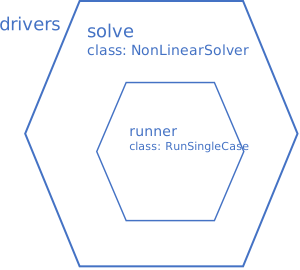
RunSingleCase executes all subsystem drivers by recursively calling the compute() method of the top system and each of its children.
This Driver does not contain a solver per se, but is helpfull to set boundary conditions, initial values, and define additional unknowns and/or equations. It is primarily meant to be used as an operating point of a NonLinearSolver driver. Therefore, RunSingleCase drivers are usually created as sub-drivers of NonLinearSolver, and are seldom directly attached to a system.
The state of the owner System can be changed with two methods:
set_valueswill impose the value of prescribed input variables, as boundary conditions;set_initwill change the initial value of iteratives before resolving the case.
Both methods take as argument a dictionary of the kind {varname: value, ...}, where varname is the name of an input variable in the context of the driver owner. For example, if the driver is attached to a system head possessing a child named sub and an inward x, {'sub.k': 0.0, 'x': 0.1} will affect variables head.sub.k and head.x.
[9]:
from cosapp.drivers import RunSingleCase

m = MultiplyWithResidue('mult')
update = m.add_driver(RunSingleCase('update'))

update.set_values({'expected_output': 15, 'K1': 2})
update.set_init({'p_in.x': 1.5})
m.run_drivers()

print("List of defined drivers:", m.drivers, sep="\n")
print("",
    f"K1 = {m.K1}",
    f"p_in.x = {m.p_in.x}",
    f"p_out.x = {m.p_out.x}",
    f"residues: {list(m.residues.values())}",
    sep="\n"
)
RunSingleCase.get_problem called with no prior call to RunSingleCase.setup_run.
List of defined drivers:
OrderedDict([('update', update (on System 'mult') - RunSingleCase)])

K1 = 2
p_in.x = 1.5
p_out.x = 3.0
residues: [Residue(p_out.x == expected_output): -12.0]
Another important ability of this driver is the addition of unknowns and equations to the mathematical system. There are two kinds of problems for a RunSingleCase driver:
Design problems: They are associated with design variables that are frozen in the final product; e.g. the diameter of a pipe. Design unknowns are uniquely defined, and shared between all design points, when several
RunSingleCasedrivers are present (see tutorial on multi-point design).Local off-design problems: They correspond to constraints imposed at the design point only. Local
RunSingleCaseunknowns will usually assume different values at different design points.
Design and off-design problems are stored in attributes design and offdesign, respectively. Unknowns and equations are added with methods add_unknown and add_equation:
case.design  \
    .add_unknown('pipe.diameter')  \  # value shared with all points
    .add_equation('pipe.flow_in.W == 50')  # Constraint equation

case.offdesign  \
    .add_unknown('pedal.angle')  \  # value pertains to current point only
    .add_equation('outlet.pressure == p_atm')  # Constraint equation
Note that case.add_unknown and case.add_equation are shortcuts to case.offdesign.add_unknown and case.offdesign.add_equation, respectively.
Unknowns and equations defined at system setup define global off-design constraints. Such problems are usually imposed by physics (continuity conditions, conservation laws, etc.), and apply to all RunSingleCase drivers.
The good practice is to have by default the system operating in off-design condition, and introduce design methods to design it (see tutorial on design methods).
Some systems may impose off-design equations without declaring off-design unknowns, and vice versa. It is up to the user to close the mathematical problem by providing appropriate degrees of freedom and constraints, when required.
Ultimately, the solver will check if the mathematical system is square before solving it.
[10]:
m.drivers.clear() # Remove all drivers on the system `m`
solver = m.add_driver(NonLinearSolver('solver'))
update = solver.add_child(RunSingleCase('update'))

# Customization of the case
update.set_values({'expected_output': 15})

# Execution
m.run_drivers()

print(
    "Off-design default",
    f"K1 = {m.K1}",
    f"p_in.x = {m.p_in.x}",
    f"p_out.x = {m.p_out.x}",
    sep="\n"
)
Off-design default
K1 = 2
p_in.x = 7.5
p_out.x = 15.0
Design methods are defined at system level, and can be activated on demand in a simulation (more info in the Design Method tutorial).
[11]:
class MultiplyWithDesignMethod(System):

    def setup(self):
        self.add_input(XPort, 'p_in', {'x': 1.})
        self.add_output(XPort, 'p_out', {'x': 1.})

        self.add_inward('K1', 5.)

        # Off-design default
        self.add_inward('expected_output', 7.5)
        self.add_unknown('p_in.x').add_equation('p_out.x == expected_output')

        # Design methods
        self.add_inward('dx_design', 1.0)
        self.add_design_method('dx').add_unknown('K1').add_equation('p_out.x - p_in.x == dx_design')

    def compute(self):
        self.p_out.x = self.p_in.x * self.K1


from cosapp.recorders import DataFrameRecorder

m = MultiplyWithDesignMethod('m')
m.expected_output = 7.5

solver = m.add_driver(NonLinearSolver('solver'))
solver.add_recorder(DataFrameRecorder(includes=['K1', 'p_*.x', 'expected*']))

# Design
design = solver.add_child(RunSingleCase('design'))
design.set_values({
    'expected_output': 7.5,
    'dx_design': 5,
})
design.design.extend(m.design_methods['dx'])

m.run_drivers()

print(
    "Design:",
    f"K1 = {m.K1}",
    f"p_in.x = {m.p_in.x}",
    f"p_out.x = {m.p_out.x}",
    sep="\n"
)
print(solver.problem)
Design:
K1 = 3.0
p_in.x = 2.5
p_out.x = 7.5
Unknowns
  K1 = 3.0
  p_in.x = 2.5
Equations
  p_out.x - p_in.x == dx_design := 0.0
  p_out.x == expected_output := 0.0
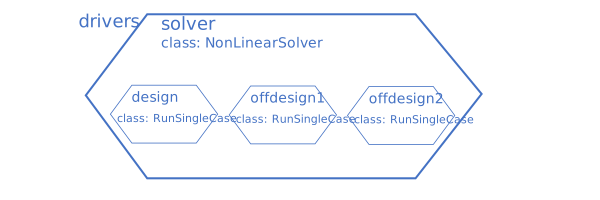
RunSingleCase drivers may also be used to simulate a life cycle made of states. On next example, a design point is followed by two off-design operating points.
[12]:
# Off-design 1
offdesign1 = solver.add_child(RunSingleCase('offdesign1'))
offdesign1.set_values({'expected_output': 15.})

# Off-design 2
offdesign2 = solver.add_child(RunSingleCase('offdesign2'))
offdesign2.set_values({'expected_output': 24.})

m.run_drivers()

df = solver.recorder.export_data()  # export recorded data as a pandas DataFrame
df
[12]:
| Section | Status | Error code | Reference | K1 | expected_output | p_in.x | p_out.x | |
|---|---|---|---|---|---|---|---|---|
| 0 | 0 | design | 3.0 | 7.5 | 2.5 | 7.5 | ||
| 1 | 0 | offdesign1 | 3.0 | 15.0 | 5.0 | 15.0 | ||
| 2 | 0 | offdesign2 | 3.0 | 24.0 | 8.0 | 24.0 |
For advanced design methods tutorial and strategy to create a “design model” from a “simulation model”, we recommend the tutorial on Design Methods.
Congrats! You are now ready to launch computation on your System with CoSApp!